
Connect Four
Drop discs down a seven-column board and line up four before your opponent does.
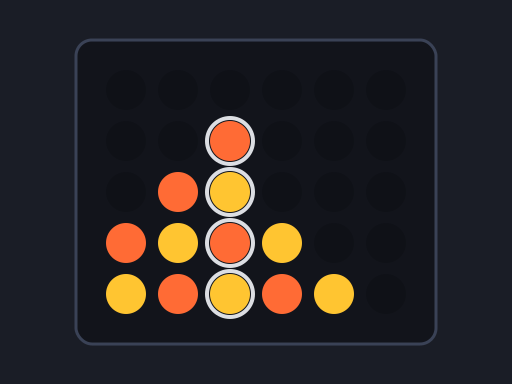
Connect Four · 2 Player · 1 plays
🎮You May Also Like







About Connect Four
Connect Four is Tic Tac Toe with gravity, and that one change makes it a far deeper game. The board is seven columns wide and six rows tall. You choose a column, your disc falls to the lowest free slot in it, and you win by lining up four of your colour horizontally, vertically or on either diagonal.
Because discs stack, you never fully control where your piece lands — and every move you make creates a new landing spot directly above it for your opponent. Half of Connect Four is spotting your own threats; the other half is not accidentally building a platform under someone else’s.
Play 2 Players on one device, or against the computer. Easy takes an immediate win or block if one exists and otherwise plays at random; Hard searches four moves ahead with a preference for the centre columns, which is enough to punish most casual play.
How to Play Connect Four
- Choose a mode. Red always moves first; against the computer you are Red.
- Click or tap a column to drop a disc into it. On desktop the column under your cursor is highlighted so you can see where the disc will land before committing.
- Your disc falls to the lowest empty slot in that column. Full columns cannot be selected.
- Line up four of your colour in any direction to win. The winning four are outlined in white.
- If all 42 slots fill with no line, the game is a draw. Press Play Again to reset; the scoreboard above carries across games.
Controls
Desktop: move the mouse over the board to preview a column — a pale vertical band shows which one you are on — then click to drop. There are no keyboard controls.
Mobile and tablet: tap anywhere in a column to drop into it. The column is determined by where you lift your finger, so you can slide across the board to adjust before committing.
Against the computer, the opponent replies after roughly a third of a second. The column preview disappears while it is thinking so you cannot drop out of turn.
Tips and Tricks
- Play the centre column first. It is part of more winning lines than any other column, and every strong opening runs through it.
- Count the parity of your threats. A threat on an odd row usually favours the first player, one on an even row the second. This is the deepest idea in the game and the one that separates strong players from good ones.
- Do not build the step under your opponent’s win. Before dropping, look at the slot directly above where your disc will land — if it completes their four, pick a different column.
- Look for the double threat. Two open ends on the same row means your opponent can only block one. This is how nearly all wins actually happen.
- Watch the diagonals. Horizontal and vertical fours are easy to spot; diagonals are what people miss, and the computer never does.
Frequently Asked Questions
Can two people play Connect Four on the same device?
Yes. Choose 2 Players mode and take turns tapping columns on the same screen. Red goes first and the scoreboard tracks both sides.
How hard is the computer opponent?
Easy takes an immediate win or block and otherwise moves randomly. Hard searches four moves ahead and favours central columns — beatable, but it will punish a careless move.
How big is the board?
Seven columns by six rows, 42 slots in total — the standard Connect Four layout.
Does a diagonal line count as a win?
Yes. Four in a row wins horizontally, vertically or diagonally in either direction.
Who has the advantage?
With perfect play the first player wins, but only by starting in the centre column and playing precisely. In practice games are close.
Last updated 2026-09-08 · More 2 Player games